Release-Verlauf direkt von GitHub. Stündlich aktualisiert.
33GitHub-Sterne
v2.0.1
v2.0.1
### Fixed

- Session expiry is now honored. `IPMIDECK_AUTH_SESSION_EXPIRY` (and the `auth.session_expiry`
  config key) now set the session token and cookie lifetime; previously the setting had no effect
  and the lifetime was always 24 hours.
- FanPilot status no longer reports "active" for monitoring-only vendors (HPE, Lenovo, and unknown
  BMCs). Their fans stay under the BMC's own control, and the dashboard now shows that instead of a
  false "FanPilot active" state.
<p align="center">
<a href="https://www.python.org/"><img alt="Python 3.11+" src="https://img.shields.io/badge/Python-3.11%2B-3776AB?logo=python&logoColor=white"></a>
<a href="https://github.com/ipmideck/IPMIDeck/blob/v2.0.0/LICENSE"><img alt="License: Apache 2.0" src="https://img.shields.io/badge/License-Apache%202.0-D22128?logo=apache&logoColor=white"></a>
<a href="https://hub.docker.com/r/devluigi06/ipmideck"><img alt="Docker Hub pulls" src="https://img.shields.io/docker/pulls/devluigi06/ipmideck?logo=docker&logoColor=white&label=Docker%20pulls&color=2496ED"></a>
<a href="https://pypi.org/project/ipmideck/"><img alt="PyPI version" src="https://img.shields.io/pypi/v/ipmideck?logo=pypi&logoColor=white&label=PyPI&color=FFD43B"></a>
<img alt="Supported BMCs: Dell, Supermicro, IBM, HPE, Lenovo" src="https://img.shields.io/badge/BMC-Dell%20%7C%20Supermicro%20%7C%20IBM%20%7C%20HPE%20%7C%20Lenovo-06B6D4">
</p>
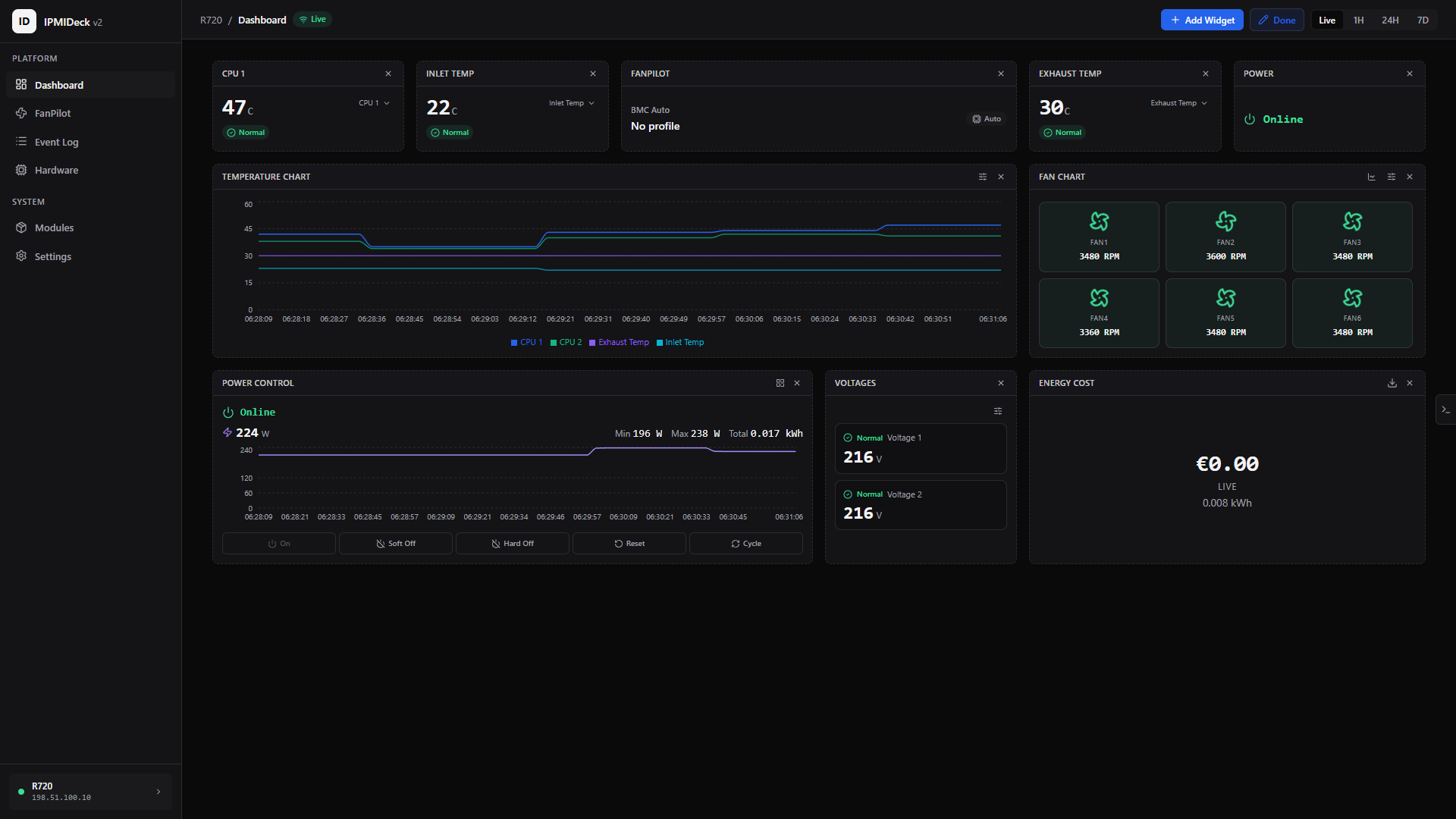
v2.0.0 is a full rewrite. v1 was one HTML page that pushed fan commands at a single Dell. v2 is a Python/FastAPI backend serving a React dashboard, talking to as many BMCs as you want over `ipmitool`.
Everything runs on your box. SQLite on disk, no cloud, no telemetry.
## What it does
| Area | What you get |
|---|---|
| Monitoring | Live temperature, fan RPM, voltage and power over a WebSocket. History charts at 1H, 24H and 7D. |
| FanPilot | Drag-and-drop fan curves. The loop runs in the backend, so it keeps working with the browser closed. |
| Power | On, soft off, hard off, reset and cycle, with an audit log. Tracks kWh and cost per server. |
| Event log | Browse and search the BMC event log. Export to CSV or JSON. |
| Inventory | FRU data: board, chassis, product. |
| Interface | 12 languages, dark and light themes, command palette, mobile layout. |
## Fan safety
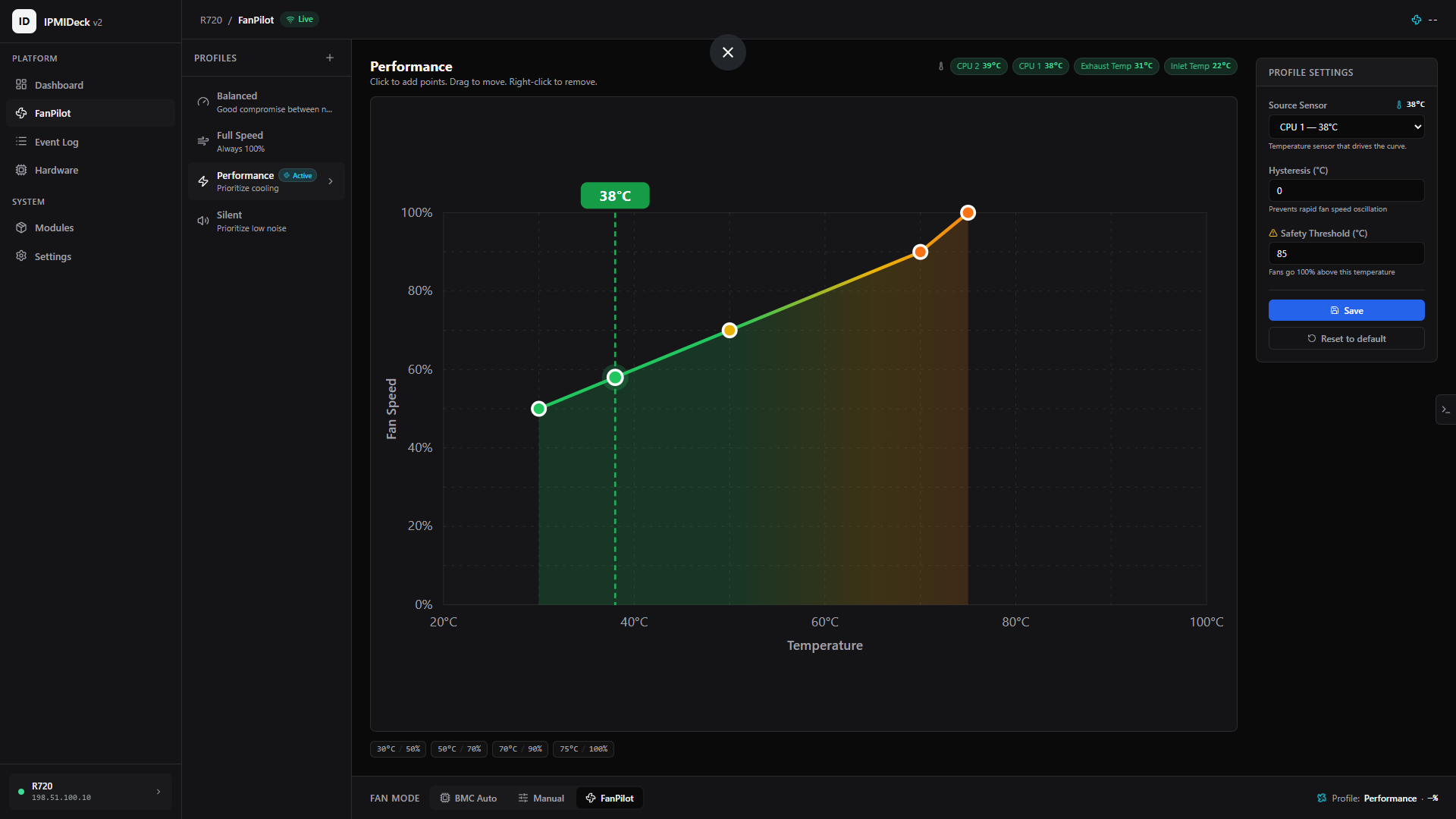
Above your critical threshold (85 °C by default) fans go to 100% and stay there until the temperature clears the hysteresis band. If a BMC stops answering, FanPilot fails safe instead of leaving the fans wherever they were. On shutdown it hands automatic fan control back to the BMC, including on Ctrl+C and `docker stop`.
## Supported hardware
Sensors, power, event log and FRU work on any IPMI 2.0 BMC. Fan control is vendor-specific.
| Vendor | Fan control | Tier | Why |
|---|---|---|---|
| Dell PowerEdge (iDRAC) | Yes | Tested | Validated on real hardware (R720) |
| Supermicro (X10+) | Yes | Experimental | Both fan zones, not exhaustively tested |
| IBM System x (IMM) | Yes | Experimental | Dual fan bank, not exhaustively tested |
| HPE ProLiant (iLO) | No | Monitoring only | iLO exposes no IPMI fan-control interface |
| Lenovo ThinkSystem (XCC) | No | Monitoring only | No reliable way to restore automatic mode |
| Generic / unknown BMC | No | Monitoring only | Never sends raw writes it cannot verify |
Monitoring-only boxes still get full sensors, power, event log and FRU. If you run Supermicro or IBM, reports are welcome. That is how they move to Tested.
## Install
Docker:
```bash
docker run -d --name ipmideck --network host \
-v ipmideck-data:/data \
devluigi06/ipmideck:latest
```
On Windows and macOS use `-p 3000:3000` instead of `--network host`.
pip (needs `ipmitool` on the system):
```bash
pip install ipmideck
ipmideck start
```
Open `http://<your-ip>:3000` and the setup wizard takes over. No hardware around? `ipmideck --demo` seeds fake servers so you can click through everything.
## Coming from v1
There is no in-place upgrade. Different stack, different database, different config. Install fresh and re-add your servers through the wizard.
| | v1 | v2 |
|---|---|---|
| Stack | Node.js + Express | Python 3.11+ / FastAPI + React |
| Image | `devluigi06/ipmi-fanpilot` | `devluigi06/ipmideck` |
| Data volume | `/app` | `/data` |
| Env prefix | none | `IPMIDECK_*` |
Port 3000 is unchanged.
## Links
[Docs](https://docs.ipmideck.com/en/getting-started) · [Docker Hub](https://hub.docker.com/r/devluigi06/ipmideck) · [PyPI](https://pypi.org/project/ipmideck/) · [Issues](https://github.com/ipmideck/IPMIDeck/issues)
The docs have per-vendor guides for turning IPMI on: iDRAC, iLO, Supermicro, XCC and IMM.
---
Bad fan control can damage hardware. Test somewhere that is not production first. Apache-2.0, provided as-is.
**Full Changelog**: https://github.com/ipmideck/IPMIDeck/compare/84df472...v2.0.0